What is Goat vs Zombies?
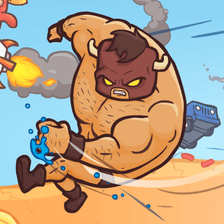
Goat vs Zombies is a fast-paced action arcade game that puts players in control of a fearless goat tasked with defending its territory from relentless waves of zombies. Combining humor, strategy, and frantic combat, the game has gained popularity among casual gamers looking for quick, satisfying gameplay sessions.
The premise is simple but addictive: use your goat's powerful horns, speed, and special abilities to ram, headbutt, and stomp zombies into oblivion before they overrun the farm.
Gameplay Overview
The core loop revolves around survival and progression. Each level introduces new zombie types, environmental hazards, and boss encounters that test your reflexes and strategic thinking.
Core Mechanics
- Horn Charge: Build momentum to deliver devastating ramming attacks that can plow through multiple enemies.
- Dodge and Roll: Avoid zombie grabs and projectiles with quick evasive maneuvers.
- Power-Ups: Collect items like flaming horns, lightning hooves, and shield aura to gain temporary advantages.
- Upgrade System: Earn coins to permanently boost your goat's health, speed, and attack damage.
Zombie Variety
The game features a wide array of undead enemies, including shambling walkers, fast runners, armored brutes, and explosive bloaters. Each requires a different approach, keeping combat fresh and challenging.
Game Modes
- Story Mode: Follow the goat's journey through multiple themed environments, from the farm to the city ruins.
- Survival Mode: Endure endless waves and compete for high scores on the global leaderboard.
- Boss Rush: Face off against the toughest zombie bosses back-to-back.
- Daily Challenges: Complete unique objectives for bonus rewards.
Tips and Strategies
For Beginners
- Prioritize upgrading health and horn damage early on for better survivability.
- Always keep moving—standing still makes you an easy target for grouped zombies.
- Save power-ups for boss fights or large hordes rather than using them on small groups.
Advanced Tactics
- Chain horn charges by timing your dashes through tightly packed enemies for combo bonuses.
- Learn each zombie type's attack pattern to dodge efficiently and counter at the right moment.
- Use environmental hazards like exploding barrels and cliffs to take out groups quickly.
Graphics and Sound Design
Goat vs Zombies features colorful, cartoon-style visuals that balance humor with gritty zombie aesthetics. The soundtrack pumps up the action with energetic rock and electronic beats, while exaggerated sound effects—comical bleats, crunchy impacts, and zombie groans—add personality to every encounter.
Pros and Cons
Pros
- Easy to pick up with intuitive controls suitable for all ages.
- Hilarious premise and charming character animations.
- Plenty of content with multiple modes and unlockables.
- Satisfying combat with responsive feedback.
- Regular updates and seasonal events keep the game fresh.
Cons
- Difficulty can spike unexpectedly in later levels.
- Some power-ups feel underwhelming compared to others.
- Free-to-play version includes ads that may interrupt gameplay.
- Limited multiplayer features—mostly a solo experience.
Who Should Play Goat vs Zombies?
This game is perfect for fans of arcade action, casual gamers seeking short bursts of fun, and anyone who enjoys quirky humor mixed with zombie-slaying chaos. Whether you have five minutes or an hour to spare, Goat vs Zombies delivers consistent entertainment with plenty of replay value.
Final Thoughts
Goat vs Zombies stands out in the crowded arcade genre thanks to its unique premise, polished mechanics, and addictive progression. While it has minor flaws, the charm and chaos of headbutting zombies as a heroic goat make it a worthwhile addition to any casual gamer's library.




 Stickman Go
 Brain Test 3: Tricky Quests
 Retro Bowl
 Infinity Loop
 Moto X3M
 Moto X3M 5 Pool Party
 Geometry Dash
 Highway Racer 3d
 Burnin' Rubber 5 Xs
 Subway Surfers
 Run 3 Editor
 Raccoon Adventure: City Simulator 3D
 Moto X3m Pool Party
 G Switch 3
 Snow Rider 3D
 Tunnel Rush
 Tiny Fishing
 Moto X3m Winter
 Neon Challenge Legends
 Magic Battleground
 Petnest Io
 Block Blast
 Vex 7
Vex 7 Run 3
Run 3 Tap Tap Shots
 Volley Random
 Pokemon Emerald
 Friday Night Funkin'
 Blocky Trials
 2048
2048




No comments yet.